Contract metadata
Enscribe brings contract metadata onchain through ENS text records. Projects can attach information to their contracts — logos, descriptions, social links, audits, and documentation — and Enscribe displays it on contract explore pages.
This follows the draft ENSIP proposal for contract metadata standards.
Contract metadata fields
Contract details pages show several categories of text records that contracts or their parent organizations can set:
Basic information
- name: Display name for the contract (e.g., "Uniswap V3 Router")
- description: What the contract does
- url: Official website or landing page
- avatar: Contract logo or icon (IPFS hash, HTTP URL, or data URI)
- header: Banner or background image
Social and community
- com.github: GitHub repository URL
- com.twitter: Twitter/X profile
- org.telegram: Telegram community link
- com.linkedin: LinkedIn company page
- Any other social text record you want to set
Documentation and audit reports
- docs: Documentation URL
- audits: Security audit reports (can link to a page with multiple audits)
- category: Contract type or category (e.g., "DeFi", "NFT", "Governance")
- license: Software license information
Organization-level vs contract-level metadata
Metadata inheritance lets you set metadata at the organization level (the parent ENS name) and have it automatically apply to all contracts under that name.
For example, if you set an avatar and social links on protocol.eth, all contracts named under it (router.protocol.eth, factory.protocol.eth, etc.) will inherit those values — unless they set their own.
How it works
protocol.eth (organization)
├─ avatar: ipfs://QmXyz...
├─ com.github: github.com/protocol
├─ com.twitter: twitter.com/protocol
│
├─ router.protocol.eth
│  └─ inherits all metadata from protocol.eth
│
├─ factory.protocol.eth
   ├─ description: "Factory contract for creating pairs"
   └─ inherits avatar and social links from protocol.eth
This means you can establish your project's identity once at the top level, and all your contracts benefit from it. You only need to set contract-specific details (like descriptions or audit links) for individual contracts.
How contract metadata is retrieved
Behind every contract page on Enscribe is a metadata retrieval API that queries ENS records at multiple levels and integrates with external verification services.
Multi-level querying
When you view a contract on Enscribe, the system doesn't just look at that specific contract's ENS name. It builds a complete hierarchy and queries each level to find the most specific metadata available.
When the Contract Metadata API receives a request for router.v3.uniswap.eth, here's how it works:
1. router.v3.uniswap.eth (most specific)
   ↓ no metadata found
2. v3.uniswap.eth (parent level)
   ↓ avatar, name found
3. uniswap.eth (organization level)
   ↓ social links, header found
4. eth (TLD)
   ↓ stop
The system queries all levels in parallel for maximum speed, then prioritizes the most specific value found for each field. A contract can inherit its organization's avatar and social links, override the description with contract-specific details, and use the project-level header image — all determined automatically based on what's set at each level.
The contract metadata API
A public API endpoint provides access to this metadata:
https://app.enscribe.xyz/api/v1/contractMetadata/<chain-id>/<ens-name>
Example request
curl https://app.enscribe.xyz/api/v1/contractMetadata/1/v2.app.enscribe.eth
Example response
{
    "name": "Enscribe V2 Contract",
    "avatar": "https://euc.li/enscribe.eth",
    "description": "Fixing Ethereum UX one smart contract at a time. 🔨 Give your smart contracts an identity at https://app.enscribe.xyz🌟",
    "header": "https://euc.li/enscribe.eth/h",
    "url": "https://www.enscribe.xyz/",
    "category": "Security",
    "license": "MIT",
    "docs": "https://enscribe.xyz/docs",
    "audits": "[{\"Cantina\":\"https://github.com/coinbase/smart-wallet/blob/main/audits/Cantina-December-2023.pdf\"}]",
    "com.github": "enscribexyz/enscribe-contracts",
    "com.twitter": "enscribe_",
    "org.telegram": "enscribers"
}
The API works across all chains Enscribe supports (Ethereum, Base, Optimism, Arbitrum, Scroll, Linea, and their testnets). It automatically checks parent domains for inherited metadata, fetches all records concurrently for speed, and returns a standard JSON format with all available text records.
Use cases
- Wallets: Display rich contract information in transaction confirmations
- Block explorers: Show official metadata alongside contract data
- DApp frontends: Pull verified information about contracts you interact with
- Aggregators: Build indices of contract metadata across the ecosystem
- Documentation sites: Auto-generate contract directories with official info
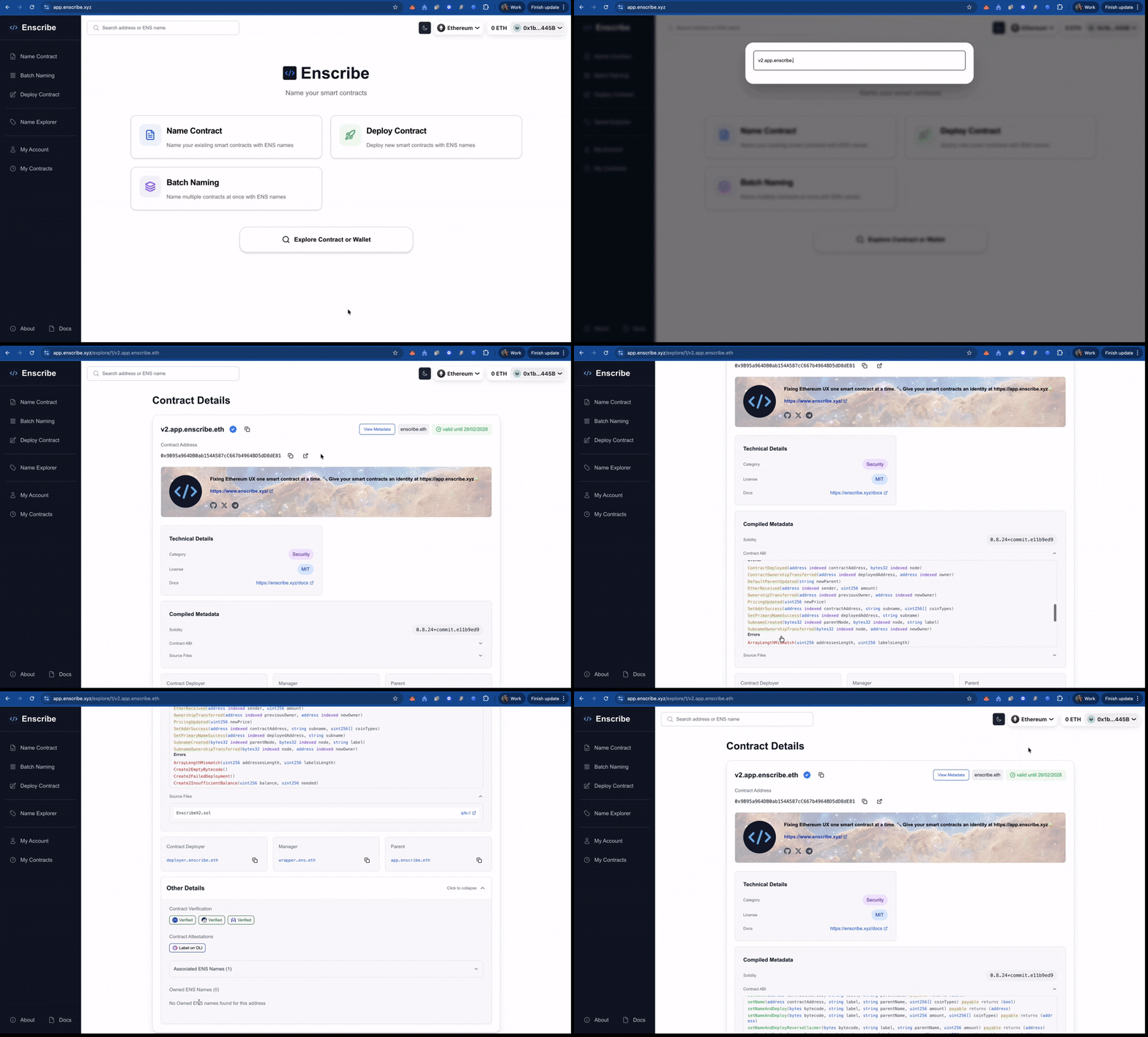
The contract explore page
The contract explore page displays this metadata.

Header and avatar section
- Circular avatar prominently displayed
- Header image as a subtle background
- Contract name and description
- Social links with branded icons, making it easy to find official channels
Clean layout
- Contract details like docs, audits, category, license organized in clear sections
- ENS management and organization information (owner, manager, parent)
- Contract deployer and verification status
- ABI and source code when verified on Sourcify
All text records are visible in a dedicated metadata section. You can set metadata for your contracts using the Name Explorer.