7 posts tagged with "guides"

View All Tags

How to manage versions in upgradeable smart contracts

· 6 min read
Abhijeet Bhagat
Enscribe Senior Engineer

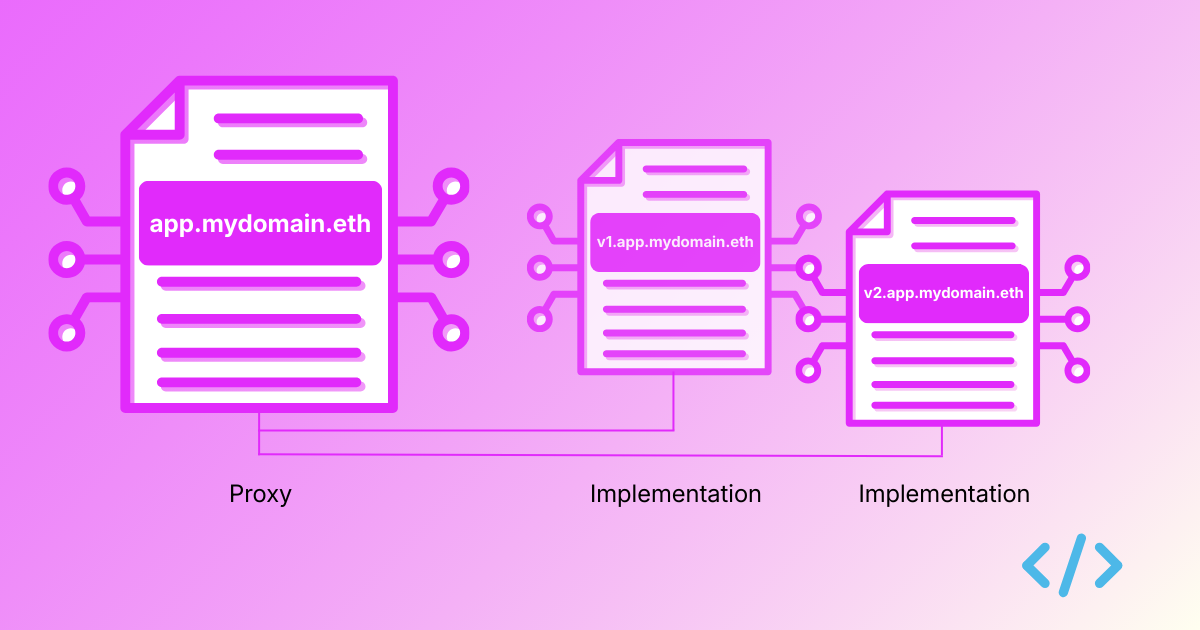
Proxy and implementation contracts visual

In our recent guide on smart contract versioning, we explored how smart contracts can be versioned and suggested a few ideas on how to integrate contract versioning in your existing deployment pipelines. This post is a sequel explaining how similar ideas can be applied when you have upgradeable contracts.
In smart contract engineering, the proxy pattern is a standard for smart contract upgradability. By separating the proxy (stable user-facing abstraction) from the implementation (the upgradeable logic), developers can ship improvements without breaking contract calls on the clients because the address changed.

Whilst naming the implementation contract is awesome, what happens if you just name either the proxy contract or the implementation contract? It introduces a ‘transparency problem’ — without naming both the contracts, figuring out which contract does what and which version of the logic is currently active behind a proxy becomes a headache for users, developers and auditors.

proxy

A simple proxy and implementation contract

How can a proxy contract differentiate a transaction that is meant to upgrade the implementation address it points to from a transaction that is meant to interact with it?

TransparentUpgradeableProxy pattern ensures that only the admin can upgrade the implementation whilst for normal users, it ‘transparently’ forwards the transaction to the implementation contract, executing the logic, as if the proxy wasn’t there (hence the name).

Let’s first see how the TransparentUpgradeableProxy proxy contract from OpenZeppelin that uses the transparent upgradeable proxy pattern looks like.

We have a constructor that configures the proxy admin and the implementation address:

constructor(address _logic, address initialOwner, bytes memory _data) payable ERC1967Proxy(_logic, _data) {
_admin = address(new ProxyAdmin(initialOwner));

// Set the storage value and emit an event for ERC-1967 compatibility
ERC1967Utils.changeAdmin(_proxyAdmin());
}

The _fallback function implements differentiating an admin trying to upgrade the contract from other accounts trying to call the implementation’s logic:

function _fallback() internal virtual override {
if (msg.sender == _proxyAdmin()) {
if (msg.sig != ITransparentUpgradeableProxy.upgradeToAndCall.selector) {
revert ProxyDeniedAdminAccess();
} else {
_dispatchUpgradeToAndCall();
}
} else {
super._fallback();
}
}

A proxy admin is only allowed to upgrade the proxy’s implementation address. Any calls to execute business logic are reverted.

Now let’s take a look at our implementation contract the proxy points to.

For a contract to have a primary name set, a reverse record needs to be set with the Reverse Registrar. This can be done only by the owner of the contract. To support ownership, a contract needs to implement the Ownable interface. This is how a simple Ownable implementation contract would look:

// SPDX-License-Identifier: MIT
pragma solidity ^0.8.24;
import "@openzeppelin/contracts/access/Ownable.sol";
import "@openzeppelin/contracts/proxy/utils/Initializable.sol";

contract ImplementationV1 is Initializable, Ownable {

string public message;

// Runs only on the implementation instance (not on proxy storage).
constructor() Ownable(msg.sender) {
_disableInitializers(); // prevents initializing the implementation directly
}

// Runs through proxy via delegatecall; writes owner/message into proxy storage.
function initialize(address initialOwner, string calldata initialMessage) external initializer {
_transferOwnership(initialOwner);
message = initialMessage;
}

function setMessage(string calldata newMessage) external onlyOwner {
message = newMessage;
}
}

We can now deploy both these contracts and point the proxy contract to the implementation by using a number of ways:

If deploying a new proxy: pass (implementationAddress, adminAddress, initData) to proxy constructor. If upgrading an existing proxy: admin calls upgradeToAndCall(newImplementationAddress, initData) (or upgradeTo if already initialized).

The naming convention for proxy and implementation contracts

To effectively version a proxy contract and the implementation contract, we recommend a simple approach:

The proxy Identity: Assign your primary ENS name (e.g., app.mydomain.eth) directly to the proxy contract. This is the stable address that frontends and users interact with. The Logic Versions: Assign versioned subnames (e.g., v1.app.mydomain.eth, v2.app.mydomain.eth) to the individual Implementation contracts as they are deployed.

Versioning with Foundry

The following CI/CD pipeline deployment uses the Enscribe Foundry library to set names for the proxy and its implementation. In a deploy script, you simply deploy the new proxy, its implementation and tag the new version programmatically.


// SPDX-License-Identifier: MIT
pragma solidity ^0.8.0;
import {Script} from "forge-std/Script.sol";
import {TransparentUpgradeableProxy} from "@openzeppelin/contracts/proxy/transparent/TransparentUpgradeableProxy.sol";
import {ImplementationV1} from "../src/ImplementationV1.sol";
import {Ens} from "enscribe/Ens.sol";

contract UpgradeScript is Script {
function run() public {
// Deployer EOA that signs deployment txs.
uint256 deployerPrivateKey = vm.envUint("PRIVATE_KEY");

// App owner (calls app functions via proxy, e.g. setMessage).
address appOwner = vm.envAddress("APP_OWNER");

// Proxy admin (upgrade authority). Keep separate from appOwner in transparent pattern.
address proxyAdmin = vm.envAddress("PROXY_ADMIN");

// Example init value for app state.
string memory initialMessage = vm.envString("INITIAL_MESSAGE");

require(appOwner != proxyAdmin, "Use separate app owner and proxy admin");

vm.startBroadcast(deployerPrivateKey);

// Deploy implementation contract (logic only).
ImplementationV1 impl = new ImplementationV1();

// Encode initializer call to run via delegatecall in proxy context.
bytes memory initData = abi.encodeCall(
OwnableAppV1.initialize,
(appOwner, initialMessage)
);

// Deploy proxy pointing to implementation, with admin + init data.
TransparentUpgradeableProxy proxy = new TransparentUpgradeableProxy(
address(impl),
proxyAdmin,
initData
);


// Version the proxy (e.g., app.mydomain.eth)
Ens.setName(
block.chainid,
address(implementation),
string.concat("app", vm.envString("ENS_PARENT"))
);

// Version the implementation (e.g., v1.app.mydomain.eth)
Ens.setName(
block.chainid,
address(implementation),
string.concat(vm.envString("VERSION"), ".", "app", vm.envString("ENS_PARENT"))
);

vm.stopBroadcast();
}
}

Just like with standard contracts, you can run this via GitHub Actions exporting VERSION=v1 and ENS_PARENT=mydomain.eth in addition to other environment variables. The proxy and implementation are instantly versioned the moment they are deployed.

When we now go to block explorers, we can now clearly see that our user-facing app (the proxy) is named as app.mydomain.eth and the concrete implementation it points to is named as v1.app.mydomain.eth.

Here’s an example of how this same proxy contract named as cooldapp.abhi.eth looks like on Blockscout:

proxy

And here’s how the implementation contract named as v1.cooldapp.abhi.eth looks like:

implementation

Should you want to update the implementation, you can simply deploy and name it as v2.app.mydomain.eth and upgrade the proxy to point to this new version.

For other approaches to versioning regular smart contracts you can refer to our recent guide on smart contract versioning.

Why versioning matters for upgradeable contracts

Adopting onchain versioning for upgradeable contracts solves the transparency problem. We are moving from a world where users are forced to blindly trust an app upgrade to one where every implementation logic is distinctly named, human-readable and easy to verify on block explorers.

Ready to bring transparency to your upgrades? Check out the Enscribe Foundry Library, Hardhat Plugin, and TypeScript SDK to start versioning your proxies today.

Happy versioning! 🚀

How to perform onchain versioning of smart contracts

· 5 min read
Abhijeet Bhagat
Enscribe Senior Engineer

In software engineering, versioning is a core tenet of release management. However, when smart contracts are deployed to Ethereum networks, the deployment artifacts live as 42-character hexadecimal strings, with no onchain versioning information being captured about them.

They may be versioned in the GitHub repositories they were deployed on, or documented in docs, but there is no decentralised location where release information is captured, which seems ironic given they live on permissionless networks.

We want to see this change. It is now possible to easily deploy smart contracts with onchain versioning, and in this post we’re going to outline how you can do it.

We will demonstrate how you can bridge the gap between CI/CD pipelines, deployment scripts and onchain identity by programmatically assigning ENS names during deployment using open source tools.

Most developers use Foundry and Hardhat - two very popular options for smart contracts management. We provide examples showing usages of both these tools.

We’ll use Github Actions as an example but the steps/configs described should be fairly straightforward and similar with other CI/CD tools.

Naming with Foundry

We can use the Enscribe Foundry library that is written in Solidity to version your contracts. This is an example script that demonstrates how you can set a name to a contract using an environment variable:

// SPDX-License-Identifier: MIT
pragma solidity ^0.8.0;

import {Script, console} from "forge-std/Script.sol";
import {Counter} from "../src/Counter.sol";
import {Ens} from "enscribe/Ens.sol";

contract MyContractScript is Script {
function run() public {
vm.startBroadcast();

counter = new Counter();
Ens.setName(block.chainid, address(counter),
string.concat(vm.envString("VERSION"), ".", vm.envString("ENS_PARENT")));

vm.stopBroadcast();
}
}

Assume we already have a top level domain name registered like mydomain.eth. You can now run this script directly from the command line to deploy & set a version for your contract:

$ export VERSION=v1 ENS_PARENT=app.mydomain.eth
$ forge script script/Counter.s.sol:CounterScript --rpc-url <BASE RPC URL> --chain-id 8453 --broadcast --private-key <PRIVATE KEY>

You can also run this script from Github Actions like so:

- name: Version Contract
env:
VERSION: v1
ENS_PARENT: app.mydomain.eth
RPC_URL: ${{ secrets.RPC_URL }}
PRIVATE_KEY: ${{ secrets.PRIVATE_KEY }}

# Execute forge script command to set the name
run: forge script script/Counter.s.sol:CounterScript --rpc-url "$RPC_URL" --chain-id 8453 --broadcast --private-key "$PRIVATE_KEY"

You can name multiple contracts in the same script as well:

// SPDX-License-Identifier: MIT
pragma solidity ^0.8.0;

import {Script, console} from "forge-std/Script.sol";
import {Counter} from "../src/Counter.sol";
import {HelloWorld} from "../src/HelloWorld.sol";
import {MyAwesomeApp} from "../src/MyAwesomeApp.sol";
import {Ens} from "enscribe/Ens.sol";

contract DeployScript is Script {
function run() public {
vm.startBroadcast();

counter = new Counter();
hello = new HelloWorld();
app = new MyAwesomeApp();

Ens.setName(block.chainid, address(counter), string.concat(vm.envString("VERSION"), ".counter.", vm.envString("ENS_PARENT"));
Ens.setName(block.chainid, address(hello), string.concat(vm.envString("VERSION"), ".hello.", vm.envString("ENS_PARENT"));
Ens.setName(block.chainid, address(app), string.concat(vm.envString("VERSION"), ".app.", vm.envString("ENS_PARENT"));

vm.stopBroadcast();
}
}
- name: Version Contracts
env:
VERSION: v1
ENS_PARENT: mydomain.eth
RPC_URL: ${{ secrets.RPC_URL }}
PRIVATE_KEY: ${{ secrets.PRIVATE_KEY }}

# Execute forge script command to set the names
run: forge script script/DeployScript.s.sol:DeployScript --rpc-url "$RPC_URL" --chain-id 8453 --broadcast --private-key "$PRIVATE_KEY"

Naming with Hardhat

If Hardhat, instead, is what you use for contracts management, then you can version using Hardhat and the Hardhat Enscribe plugin.

We can now set an environment variable in your CI/CD pipeline like $CONTRACT_NAME=v1.app.mydomain.eth and add a Hardhat Enscribe plugin command to set this name to the contract address to the pipeline:

$ npx hardhat enscribe name $CONTRACT_NAME --contract <contract address>

For e.g., this is an example Github Actions workflow file where you can set this variable and set the name of a contract:

- name: Version Contract
env:
CONTRACT_NAME: v1.app.mydomain.eth
CONTRACT_ADDRESS: ${{ env.DEPLOYED_ADDRESS }}
RPC_URL: ${{ secrets.RPC_URL }}
PRIVATE_KEY: ${{ secrets.PRIVATE_KEY }}

# Execute Hardhat plugin command to set the name
run: npx hardhat enscribe name "$CONTRACT_NAME" --contract "$CONTRACT_ADDRESS" --network mainnet

Your should add the Hardhat Enscribe plugin to your dev dependencies in the package.json file before:

{
"devDependencies": {
"hardhat": "^3.0.0",
"@enscribe/hardhat-enscribe": "^0.1.5",
...
}
}

When you trigger a build and release cycle in the pipeline, your contract is now automatically versioned.

We can use a Git based commit hash as a part of the contract version if it is preferred over semantic versioning by extracting it programmatically and exposing it as an environment variable:

- name: Extract and set Git Hash
shell: bash
run: |
# 1. Get the short hash (7 chars)
SHORT_SHA=$(git rev-parse --short HEAD)

# 2. Save it to the Global Environment for this job
echo "GIT_HASH=$SHORT_SHA" >> $GITHUB_ENV

- name: Run Deployment
run: npx hardhat enscribe name "$CONTRACT_NAME" --contract "$CONTRACT_ADDRESS" --network mainnet
env:
CONTRACT_NAME: ${{ env.GIT_HASH }}.app.mydomain.eth
CONTRACT_ADDRESS: ${{ env.DEPLOYED_ADDRESS }}
RPC_URL: ${{ secrets.RPC_URL }}
PRIVATE_KEY: ${{ secrets.PRIVATE_KEY }}

Why Versioning Matters

By adopting onchain versioning, we aren't just making our own lives easier; we are establishing long-overdue transparency for releases. We are moving from a world where users are forced to trust hexadecimal strings to one where every deployment has a human-readable, verifiable name. The tools to make this happen are now here and ready to integrate into your pipeline.

Ready to upgrade your workflow? Check out the Foundry Library, Hardhat Plugin and TypeScript SDK or these examples to start versioning your contracts.

Happy Versioning! 🚀

Naming Smart Contracts with Foundry

· 3 min read
Abhijeet Bhagat
Enscribe Senior Engineer

handshake

Foundry is one of the most popular toolchains for Ethereum smart contract development. Built in Rust, Foundry provides everything needed to build, test, and deploy smart contracts. At the center of this workflow is Forge, Foundry’s scripting and deployment tool. Forge scripts are written in Solidity itself, allowing developers to deploy contracts and interact with them.

However, one key step that developers miss in their workflows is to name their contracts right after the deployment is done. This is where our new Enscribe plugin comes in.

The key idea behind Enscribe is simple: naming should be automated and baked into the deployment scripts. Using Enscribe, a Forge script can register or update an ENS name for a deployed contract, optimally only set forward resolution (ENS → address), and set reverse resolution (address → ENS). Because this logic runs in Solidity, it integrates naturally with Foundry’s scripting environment.

Let’s see how developers can set names for their contract with Enscribe and Forge working together.

  1. Create a new project:

    forge init counter
    cd counter
  2. Install the Enscribe plugin:

    forge install enscribexyz/enscribe
  3. Install openzeppelin:

    forge install OpenZeppelin/openzeppelin-contracts
  4. Create remapping.txt in the root dir and add the following to it to simplify imports:

    enscribe/=lib/enscribe/src/
    @openzeppelin/contracts/=lib/openzeppelin-contracts/contracts/
  5. Make Counter implement Ownable:

    import "@openzeppelin/contracts/access/Ownable.sol";  

    contract Counter is Ownable {
    constructor(uint256 initialCount) Ownable(msg.sender) {
    number = initialCount
    }
    }
  6. Edit our deployment script Counter.s.sol to set a primary name for the contract once deployed:

    import {Ens} from "enscribe/Ens.sol";  
    import {Script, console} from "forge-std/Script.sol";
    import {Counter} from "../src/Counter.sol";

    contract CounterScript is Script {
    Counter public counter;

    function setUp() public {}

    function run() public {
    vm.startBroadcast();

    counter = new Counter(0);
    Ens.setName(block.chainid, address(counter), "v1.counter.abhi.eth");

    vm.stopBroadcast();
    }
    }
  7. Run the script to deploy the contract on Sepolia and set the name at deployment!

    forge script script/Counter.s.sol:CounterScript --chain-id 11155111 --rpc-url $SEPOLIA_RPC_URL --broadcast --private-key $PRIVATE_KEY

You can now view the deployed contract in Enscribe app:

details

This simplification means that teams can use Enscribe to name their releases. For example, we not only named our contract but versioned it too with v1.counter.abhi.eth.

By making contract naming easier and part of the deployment workflow with Foundry, Enscribe encourages better UX and improves safety and usability across the Ethereum ecosystem.

In a world where users increasingly should see human-readable names instead of hex addresses in wallets and explorers, Enscribe helps ensure that smart contracts are just as legible as the accounts that interact with them.

Give it a try.

Happy naming! 🚀

Name Your Contracts with the Enscribe Library

· 3 min read
Abhijeet Bhagat
Enscribe Senior Engineer

Last week, we announced the hardhat-enscribe plugin for smart contract developers to name their contracts. We showed how smart contract developers can name their contracts with hardhat:

  • Using a CLI command, powered by the hardhat-enscribe plugin, that can be executed after the deployment command
  • Using the enscribe library in the hardhat deployment script

Under the hood, the hardhat-enscribe plugin uses the same @enscribe/enscribe library. It is a small TypeScript library you can use in any app or tool.

In this post, we will take a look at how to use the library to name your smart contracts in your apps.

It is very simple to use. From its public API, a single abstraction function creates the subname, sets forward and reverse records, and returns useful metadata (tx hashes, detected contract type, explorer link).

Using the Library

Start by installing the library:

pnpm install @enscribe/enscribe  

Once installed, import the nameContract function:

import { nameContract } from "@enscribe/enscribe";

The nameContract function itself has a simple interface. It accepts the following parameters:

  • Contract name
  • Contract address
  • Wallet client (from viem or wagmi)
  • Name of the chain on which the contract address is
  • Optional flag for logging naming metrics

We now create a wallet client object with wagmi:

import useWalletClient from ‘wagmi’

const { data: walletClient } = useWalletClient()

Once we have the wallet client created, we are ready to name our contract with nameContract:

const res = await nameContract({
name: "vault.myapp.eth",
contractAddress: "0x…",
walletClient,
chainName: "sepolia",
enableMetrics: true
});

That’s it! With this single function, developers can easily set a name to their contracts without having to worry about sending individual transactions like creation of subname and setting resolutions.

However, the library is also flexible in leaking this abstraction (which isn’t a bad thing always 🙂) by exposing the following functions and use them however you want:

  • createSubname
  • setForwardResolution
  • setReverseResolution

We want to make it easier for developers to name their contracts during contract deployment time and this is where the library comes in – they can integrate it in their Hardhat scripts. But they can also name their contracts after the contract is deployed with the hardhat-enscribe plugin. You can head over to the library documentation to explore the API.

Get started

  • Hardhat plugin: install, configure, and run npm hardhat enscribe name ... to label new or existing deployments. (GitHub)
  • Core library: import @enscribe/enscribe and call nameContract() wherever you manage contracts (GitHub)
  • Docs & guides: quick starts, concepts, and best practices for contract naming and multi-chain resolution. (enscribe.xyz)

Happy naming! 🚀

Smart Contract Naming With Hardhat

· 4 min read
Abhijeet Bhagat
Enscribe Senior Engineer

Adding support for contract naming into dev workflows has always been our top priority. Hardhat is a leading Ethereum developer environment. It’s TypeScript-first, fast, and built around a clean plugin architecture. Hence, it’s the perfect tool for contract management like deployment, testing, etc. We are excited to announce a plugin for the popular Hardhat ecosystem that adds contract naming to it.

Naming your contract from the CLI

hardhat-enscribe is a Hardhat v3 plugin that assigns ENS names to contracts, handling the full flow for you:

  • subname creation
  • forward resolution and
  • reverse resolution

It auto-detects common patterns like Ownable and ReverseClaimer, waits for confirmations, and plugs neatly into a viem-powered stack. It can be installed using the following command:

pnpm install @enscribe/hardhat-enscribe  

Let’s create new Hardhat project to deploy a contract on Sepolia:

mkdir hardhat-example
cd hardhat-example
pnpm dlx hardhat --init

This will generate a skeletal Hardhat project with a sample contract with the following project structure –

hardhat.config.ts
contracts
├── Counter.sol
└── Counter.t.sol
test
└── Counter.ts
ignition
└── modules
└── Counter.ts
scripts
└── send-op-tx.ts

We can build our project with the following command:

npx hardhat build

Let’s now deploy our contract on Sepolia. For this, we’ll need to add configuration to interact with Sepolia. First, let’s export some env variables for the RPC URL and the private key of the account that we want to use to deploy the contract:

export SEPOLIA_RPC_URL=<sepolia rpc url>
export SEPOLIA_PRIVATE_KEY=<your sepolia account private key>
npx hardhat keystore set SEPOLIA_RPC_URL
npx hardhat keystore set SEPOLIA_PRIVATE_KEY

Now open the hardhat.config.ts file and add configuration for sepolia –

const config: HardhatUserConfig = {

networks: {
sepolia: {
type: "http",
chainType: "l1",
url: configVariable("SEPOLIA_RPC_URL"),
accounts: [configVariable("SEPOLIA_PRIVATE_KEY")],
},
},
}

Our sample contract Counter.sol can now be deployed on sepolia with:

npx hardhat ignition --network sepolia deploy ignition/modules/Counter.ts

Once deployed, we are now ready to name our deployed contract. We need to add the hardhat-enscribe plugin to the list of plugins first. Open the hardhat.config.ts file and add the plugin:

import hardhatEnscribePlugin from "@enscribe/hardhat-enscribe";

const config: HardhatUserConfig = {
plugins: [hardhatToolboxViemPlugin, hardhatEnscribePlugin],

}

Then, invoke the plugin by passing the name and contract address in the command:

pnpm hardhat enscribe name mycontract.app.eth --contract 0x1234...abcd

This is what you’ll see in the output –

normalized name is mycontract.app.eth

Naming completed successfully!
Contract Type: ReverseClaimer
Transactions: {
subname: '0xb5a4131bb0bf3c2708a8181349998f57c76226559042cf68423aeefc74e8cd55',
forwardResolution: '0xa6aa6ac9a0857aaeaff1ef3d69b2962ab01650230bc5c9d8d3108dcfb63cebfa',
reverseResolution: '0xb1f260a587f793251804b6f809b4d1546d81dd98c1605c5eb7d812d1afc190b9'
}

Naming your contract from a Hardhat deployment script

You aren’t limited to setting a name for a contract from the CLI though. Scripting is a very powerful feature of Hardhat that allows you to do more than just contract development. You can call APIs, interact with contracts and even interact with the blockchain. You can now name your contract from a script too and we shall now see how you can do that.

First, connect to the network and deploy the CounterModule:

import hre from "hardhat";
import CounterModule from "../ignition/modules/Counter.js";


const connection = await hre.network.connect();
const { counter } = await connection.ignition.deploy(CounterModule);

Next, get the walletClient –

 const [walletClient] = await connection.viem.getWalletClients();
console.log(`Using account: ${walletClient.account?.address}`);

Now create a normalized name –

 const ensName = `wpsqhsld.abhi.eth`;
const normalizedName = normalize(ensName);

We are now ready to set the name by using the enscribe library (more about this in the next blog) –

import { nameContract } from "@enscribe/enscribe";


try {
const result = await nameContract({
name: normalizedName,
contractAddress: counter.address,
walletClient: walletClient,
chainName: networkName,
opType: "ignition-deploy-and-name",
enableMetrics: true,
});

} catch (error) {

}

That’s it! Your contract can be deployed and named with a Hardhat script easily. You can see the full example here.

Parting Thoughts

Our focus will always be on improving developer workflows for contract naming and the hardhat-enscribe is an important integration for us.

We are continuing to focus on different ways to make contract naming better for developers. So go ahead and integrate contract naming today in your workflows!

Happy naming! 🚀

Introducing the Guides Section

· 2 min read
Nischal Sharma
Co-Founder and Lead Engineer at Enscribe

As part of our mission to fix Ethereum UX, educating users on everything to do with naming smart contracts and ENS is a key part of this.

While we have a lot of technical documentation on our site, what's been missing is guides that tie together the content in an easy to follow manner. We're launching a new Guides section to help developers deploy and name smart contracts with Enscribe on L1 and L2 networks. Think of it as a hands-on companion to our technical documentation.

What's New

The Guides section focuses on practical tutorials you can follow along. While our documentation covers technical details, these guides walk you through real workflows step by step.

Guides Section Overview The new Guides section

What You'll Find

Quick Start Guides

We organized the most common use cases:

Conceptual Guides

For developers who want to understand the underlying concepts:

We will be expanding the guides and add more real world examples and use cases shortly.

Share Your Feedback

What guides would help your development workflow? Join our Discord, Telegram, or X to share ideas and connect with other developers using Enscribe.

Visit the Guides section to start naming your smart contracts.

Happy naming! 🚀

How To Easily Name Your Existing Smart Contracts

· 4 min read
Nischal Sharma
Co-Founder and Lead Engineer at Enscribe

We’re excited to announce a new update to the “My Contracts” page on Enscribe. If you’ve ever deployed smart contracts and wished for a clearer, more structured way to manage and track them — especially across ENS names — this update is built just for you.

In this release, we’ve reimagined how developers interact with their deployed contracts by dividing the view into two clear categories:

  1. Named Contracts - Contracts deployed by the user which have an ENS Primary Name
  2. Unnamed Contracts - Contracts deployed by the user which doesn't have ENS Primary name

This makes it easy to monitor which of your contracts have verifiable identities through ENS, and which ones are still waiting to be named.

A Smarter Way to See Your Deployed Contracts

Historically, developers had to use blockchain explorers such as Etherscan, or keep their own records as which contracts they've deployed. With Enscribe we're changing that.

The “My Contracts” page automatically surfaces all contracts directly deployed by your connected wallet. This includes both contracts deployed through standard Ethereum transactions (where the transaction "to" is null) and contracts deployed using CREATE2 via Enscribe.

One thing to note: we currently do not track indirect deployments — such as contracts created through another factory contract (internal contract creation calls). This is a planned improvement and is on our roadmap for upcoming releases.

Named vs Unnamed

The page is now split into two tabs:

Named Contracts

In the Named Contracts tab, you’ll find all contracts that have been deployed by your wallet and already have a Primary ENS Name. Each contract entry displays its ENS name, contract address, the transaction hash for creation, and direct links to tools like Etherscan, Chainlens, and the ENS App. This makes it easy to verify and share your named contracts.

We support Ethereum, Base and Linea mainnets and testnets.

Named Contracts Tab

Unnamed Contracts

The Unnamed Contracts tab, helps you track contracts you’ve deployed that haven’t yet been named with ENS. Each entry includes the contract address and creation transaction hash, along with a contextual action button. Depending on the contract’s structure, this button will either prompt you to “Name Contract” (if it supports Primary Name assignment through Ownable/ERC-173/ReverseClaimer) or “Forward Resolve” (if only forward resolution is possible).

We’ve also added smart visual cues to guide you:

  • A "yellow exclamation" icon indicates contracts that support only ENS forward resolution.
  • A "green info" icon marks contracts that are eligible for full ENS primary name assignment.

Clicking on the action button takes you directly to the naming interface with the contract address pre-filled — allowing you to easily upgrade your unnamed contracts into trusted, named entities.

Unnamed Contracts Tab

Fully On-Chain, Fully Trustless

One of the most powerful aspects of our DApp is that it’s completely trustless. Enscribe doesn’t use a centralized database. All contract discovery, naming info, and status checks are done on-chain, directly from your connected wallet via RPC calls. This means no vendor lock-in, no stale cache, no single point of failure — just accurate, permissionless data every time you load the page.

Because we query the chain live, loading the full list of contracts happens asynchronously and can take a bit of time. While your contracts are being processed, you’ll see a spinner at the bottom of the table. Once loading is complete, the spinner disappears, indicating the tables are now fully up to date. This will be optimised soon.

Loading Contracts

See It in Action

We’ve recorded a short walkthrough showing how the updated “My Contracts” page works and how you can use it to name your existing or new contracts instantly.

Watch the demo here.

The Takeaway

This update turns Enscribe into more than just a naming tool — it’s now your command center for managing smart contract identity across Ethereum and Layer 2s. Whether you’re shipping production contracts or deploying testnet experiments, the new “My Contracts” page gives you a structured, intuitive way to understand what you’ve deployed and what still needs to be named.

Naming your contracts helps users trust them. It makes them recognizable in wallets, block explorers, and dApps. And now, managing that naming process is easier than ever.

For more details, visit our site, and don't hesitate to join our Discord community and Telegram group to share your feedback and experiences.

Happy Naming! 🚀